

Troubleshooting
This page collects commonly encountered issues when integrating or building HyperKit, and the recommended fixes. If your problem is not listed here, reach out to Hypercell support.
Android build
Section titled “Android build”java.lang.OutOfMemoryError: Java heap space during Android build
Symptom
Section titled “Symptom”The Android build fails with an exception similar to:
Exception in thread "Daemon client event forwarder"java.lang.OutOfMemoryError: Java heap spaceThe error typically appears during the R8 code-shrinking step, sometimes earlier inside the Gradle daemon.
Unity’s default Maximum JVM heap size is 4096 MB. That default is borderline once HyperKit’s full ad mediation stack is added (AppLovin MAX + AdMob + Amazon + Facebook). R8 performs whole-program analysis (tree shaking + obfuscation) and must hold most of the class graph in memory simultaneously, so the working set can exceed the 4 GB default and the build OOMs during minification.
- In Unity, open Edit → Preferences → External Tools (on macOS: Unity → Settings → External Tools).
- Scroll to the Android section.
- Set Maximum JVM heap size, Mbytes to 8192.
- Rebuild the project.
Recommended values
Section titled “Recommended values”- Minimum safe: 6144 MB
- Recommended: 8192 MB
- Higher (12288 / 16384) is fine if your machine has enough RAM; it does not change build output, only build-time memory headroom.
- The setting is per-machine (stored in Unity Editor prefs), not per-project. Every developer / build agent on the project needs to apply it independently.
iOS build
Section titled “iOS build”iOS build fails or the app crashes after an Xcode update (seen with Xcode 27)
Applies to
Section titled “Applies to”iOS builds made after an Xcode update. Every case we have confirmed so far was built with Xcode 27. We first saw them in October 2026, when macOS updates moved studio machines and our CI to Xcode 27. We have not confirmed failures with Xcode 26, but its iOS 15.0 deployment target limit (see below) can affect pods there too.
This is a temporary workaround. A fix is planned for an upcoming HyperKit update, and we will update this section once it is available.
Why Xcode 27 changes things
Section titled “Why Xcode 27 changes things”- Xcode 27 builds with the iOS 27 SDK. Apple requires apps built with this SDK to adopt the UIScene life cycle, otherwise they won’t launch (TN3187).
- Unity added UIScene support to 2022.3.72f1+, 6000.0.68f1+ and 6000.3.8f1+ (Unity announcement). Unity 6.2 (6000.2.x) is not on that list. Our own Unity 6000.2.15f1 builds made with Xcode 27 crashed on iPad.
- Apple lists iOS 15.0 as the lowest deployment target for Xcode 27, and also for Xcode 26.5 and 26.6 (Apple system requirements). With Xcode 27 we saw the build stop on pods set below 15.0.
Do you need to upgrade Unity?
Section titled “Do you need to upgrade Unity?”- Building with Xcode 27: you need a Unity version with UIScene support (2022.3.72f1+, 6000.0.68f1+ or 6000.3.8f1+). For HyperKit we recommend Unity 6.3: we build and test HyperKit on 6000.3.26f1.
- Building with Xcode 26: the UIScene requirement does not apply yet, so it is not a reason to upgrade Unity. Two things will make Xcode 27 unavoidable: Apple does not list macOS 27 as supported for Xcode 26, and starting April 2027 App Store Connect accepts iOS apps only if they are built with the iOS 27 SDK or later (Apple announcement).
Symptom
Section titled “Symptom”- Xcode stops on pods whose minimum iOS version is below 15.0.
- After moving to Unity 6.3, a Release archive fails to link with
Undefined symbolsforAppMetricaLibraryAdapter. - After moving to Unity 6.3, the build succeeds but the app crashes in Yandex/DivKit font code (
MACDivKitFontProviderin the crash stack).
What to change
Section titled “What to change”- Unity 6000.3.26f1 (6.3 LTS, our recommended and tested version for HyperKit), with Target minimum iOS Version set to 15.0.
- All pods at iOS 15.0 or higher.
BUILD_LIBRARY_FOR_DISTRIBUTION = NOfor theAppMetrica*pods andDivKitBinaryCompatibilityFacade. Unity 6.3 no longer sets this for pods, which causes the AppMetrica link error. On our games the DivKit font crash also stopped once the facade setting was in place.
The Podfile block in the Fix below takes care of items 2 and 3.
- Export the iOS project from Unity.
- Open the
Podfilein the exported Xcode project and add the block below at the end of the file. - Run
pod installin the exported project folder. - Build and archive from the
.xcworkspace.
post_install do |installer| installer.pods_project.targets.each do |target| target.build_configurations.each do |config| if target.name.start_with?('AppMetrica') || target.name == 'DivKitBinaryCompatibilityFacade' config.build_settings['BUILD_LIBRARY_FOR_DISTRIBUTION'] = 'NO' end if config.build_settings['IPHONEOS_DEPLOYMENT_TARGET'].to_f < 15.0 config.build_settings['IPHONEOS_DEPLOYMENT_TARGET'] = '15.0' end end endendIf the Podfile already has a post_install block, do not add a second one. Put the installer.pods_project.targets.each … end loop at the very end of the existing block, after your own settings, so they cannot override it.
- Unity rewrites the Podfile on every export, so repeat steps 2–4 after each export, or add them to your CI build script.
- The current stable HyperKit release does not support Android builds on Unity 6.3 yet. If the same project ships Android, contact Hypercell support before moving it to Unity 6.3.
- If the build still fails or the crash continues, send the build log or crash report to Hypercell support.
Build settings validation
Section titled “Build settings validation”Build fails on MAX settings validation (consent flow)
If a build stops during HyperKit’s settings validation with a message about MAX settings (for example [HyperKit] Fail validating settings with reasons: MAX Quality service is enabled, please turn it off), the cause is AppLovin’s MAX consent flow being enabled. The wording can mention “Quality service”, but the setting to turn off is the consent flow, not Quality Service. HyperKit manages user consent through Gamestoty, so MAX’s own consent flow has to stay off.
- In Unity, open AppLovin → Integration Manager → Privacy Settings.
- Uncheck Enable MAX Terms and Privacy Policy Flow.
- Build again.
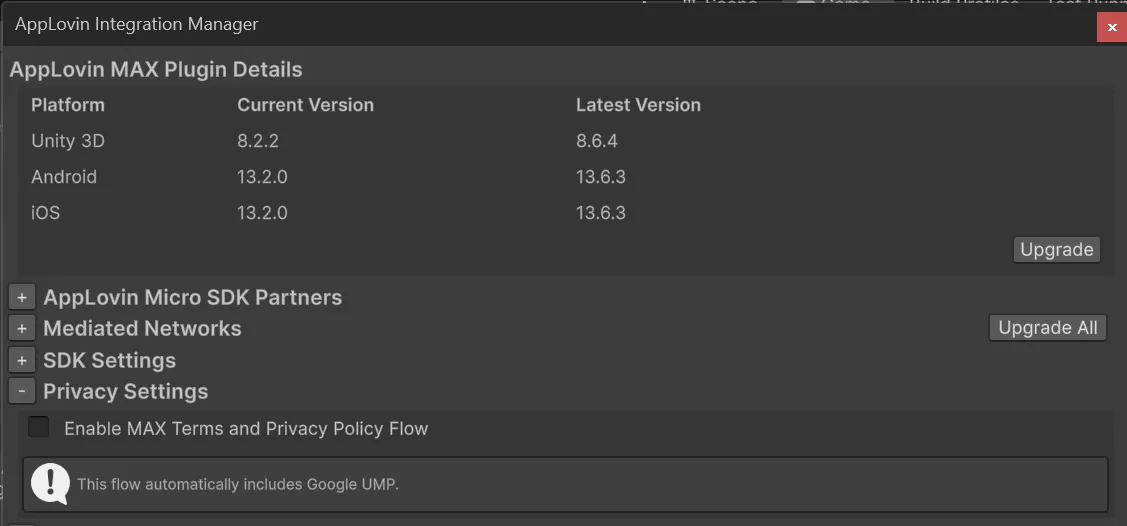
- The same validation also checks AppLovin auto-update. If the message mentions auto-update, turn off AppLovin’s automatic updates in the Integration Manager as well.
Package Manager
Section titled “Package Manager”Package [com.google.play.core@x.y.z-hotfix.z] cannot be found when resolving packages
Symptom
Section titled “Symptom”After integrating HyperKit into a new project, or updating an existing project to a newer HyperKit version, Unity Console shows errors similar to:
An error occurred while resolving packages: Package com.google.play.review@1.8.5-hotfix.2 has invalid dependencies or related test packages: com.google.play.core (dependency): Package [com.google.play.core@1.8.7-hotfix.2] cannot be found Package com.hypercell.hyperkit@1.5.12 has invalid dependencies or related test packages: com.google.play.core (dependency): Package [com.google.play.core@1.8.7-hotfix.2] cannot be foundThe exact package names and versions vary release-to-release, but the pattern is always the same: a com.google.play.* package with a -hotfix.N suffix cannot be found.
HyperKit ships custom hotfix builds of some Google Play Unity packages (currently com.google.play.core and com.google.play.review). These versions are published only to the Hypercell registry at https://packages.hypercell.pro/.
If your Packages/manifest.json has another scoped registry (commonly OpenUPM) that declares more specific scopes under com.google.play.* — for example, listing com.google.play.core or com.google.play.common explicitly — Unity routes those packages to that registry instead of Hypercell’s. Unity always prefers the longer (more specific) scope on overlap, and the hotfix versions don’t exist outside Hypercell’s registry, so resolution fails.
Open Packages/manifest.json and remove the conflicting scopes from any non-Hypercell scopedRegistries entry. Typically that means deleting com.google.play.core, com.google.play.common, and com.google.play.review from the OpenUPM block so they fall through to Hypercell’s parent scope com.google.play.
Example — before:
{ "name": "package.openupm.com", "url": "https://package.openupm.com", "scopes": [ "com.google.play.appupdate", "com.google.play.core", "com.google.play.common" ]}after:
{ "name": "package.openupm.com", "url": "https://package.openupm.com", "scopes": [ "com.google.play.appupdate" ]}Keep any Google Play packages you depend on directly that HyperKit doesn’t ship (e.g., com.google.play.appupdate) — only remove the scopes that overlap with HyperKit’s dependencies.
Make sure the Hypercell entry covers the parent scope com.google.play:
{ "name": "HyperCell Packages", "url": "https://packages.hypercell.pro", "scopes": [ "com.hypercell", "com.google.play", ... ]}After saving the manifest:
- Delete
Packages/packages-lock.jsonso Unity rebuilds it from scratch. - Reopen the project. Unity re-resolves and downloads the hotfix versions from Hypercell.
If the error persists, also delete Library/PackageCache/com.google.play.core@* and Library/PackageCache/com.google.play.common@*, then reopen the project.
How to confirm this is the issue
Section titled “How to confirm this is the issue”Open the working version’s Packages/packages-lock.json (from before the broken update). Each com.google.play.* entry includes a "url" field showing which registry served it. If any of those com.google.play.* packages list a non-packages.hypercell.pro URL, this is the scope-precedence conflict and the fix above applies.
Runtime behaviour
Section titled “Runtime behaviour”The game runs without an internet connection. Is that supported?
Expected behaviour
Section titled “Expected behaviour”Yes. A connection is not required to launch or play, and HyperKit reaches its normal initialized state offline, including on a first launch right after install.
The build embeds the Gamestoty config, and the last config the device fetched stays cached on disk. Without a network the config request gives up after 5 seconds, the SDK logs the failure, loads the embedded or cached copy and carries on.
What changes offline
Section titled “What changes offline”- No ads. Mediation has nothing to serve without a connection.
- No immediate analytics delivery. Firebase keeps events on the device and uploads them once the connection returns.
- Remote config and A/B assignment stay on the copy shipped with the build until the game runs a session online.
- Don’t gate your game behind a connectivity check of your own. Nothing in the SDK needs a connection to initialize.
- During QA, run at least one online session per build, otherwise the events never reach Firebase or the Hypercell dashboard.
HyperKit never reaches Initialized
Symptom
Section titled “Symptom”The loader scene waits on HyperKit.Initialized and it does not turn true.
What is normal
Section titled “What is normal”Part of the wait is paced by the player: the CMP consent dialog in the EEA, and the ATT prompt on iOS. On a slow network the remote config request adds up to 5 seconds on top. A few seconds on a cold start is expected.
Recommended handling
Section titled “Recommended handling”Keep the gate. There is no “init failed” state to fall back from, because every step has its own fallback: remote config falls back to the copy baked into the build, a CMP error falls through to the default consent path, and Firebase initializes asynchronously without blocking the rest.
Don’t replace the gate with a short timeout that lets the player through, since it can fire while the consent dialog is still on screen. If you want insurance against a genuinely stuck SDK, report it instead of bypassing it: log the case after 30 seconds and send it to Hypercell support.
If you do let the player in before initialization
Section titled “If you do let the player in before initialization”Safe to call:
HyperKit.Loggeris always available.HyperKit.Analyticsqueues events and handlers and replays them once analytics is live.HyperKit.Adsanswers with no-ops: ready checks return false and show callbacks fire with false.
Throws InvalidOperationException("HyperKit is not initialized") until the gate opens: HyperKit.Data, HyperKit.UA, HyperKit.AppStore, HyperKit.BuildInfoService, HyperKit.IAP.